|
|
@@ -1,155 +1,419 @@
|
|
|
-# Model Training
|
|
|
+# Model Training Guide
|
|
|
|
|
|
-This page introduces how to train MiniMind language models from scratch.
|
|
|
+Learn how to train MiniMind language models from scratch using pure PyTorch.
|
|
|
|
|
|
-## 📊 Data Preparation
|
|
|
+## 📊 Training Overview
|
|
|
|
|
|
-### 1. Download Dataset
|
|
|
+MiniMind implements a complete training pipeline:
|
|
|
|
|
|
-Download datasets from [ModelScope](https://www.modelscope.cn/datasets/gongjy/minimind_dataset/files) or [HuggingFace](https://huggingface.co/datasets/jingyaogong/minimind_dataset).
|
|
|
+```
|
|
|
+Tokenizer Training
|
|
|
+ ↓
|
|
|
+ Pretraining (Learn knowledge)
|
|
|
+ ↓
|
|
|
+ SFT (Learn conversation)
|
|
|
+ ↓
|
|
|
+ ┌───────────────────┬─────────────────────┬──────────────┐
|
|
|
+ ↓ ↓ ↓ ↓
|
|
|
+ LoRA DPO/RLHF RLAIF (PPO/GRPO/SPO) Distillation
|
|
|
+(Domain adapt) (Preference) (Reinforcement Learn) (Reasoning)
|
|
|
+```
|
|
|
+
|
|
|
+## 💰 Training Costs (Single NVIDIA 3090)
|
|
|
+
|
|
|
+| Model | Dataset | Duration | Cost (RMB) | Quality |
|
|
|
+|-------|---------|----------|-----------|---------|
|
|
|
+| MiniMind2-Small | pretrain_hq + sft_mini_512 | 2.1h | ≈3 | 😊😊 |
|
|
|
+| MiniMind2-Small | Full dataset | 38h | ≈50 | 😊😊😊😊😊😊 |
|
|
|
+| MiniMind2 | pretrain_hq + sft_mini_512 | 3.3h | ≈5 | 😊😊 |
|
|
|
+| MiniMind2 | Full dataset | 122h | ≈160 | 😊😊😊😊😊😊😊 |
|
|
|
+
|
|
|
+!!! success "Ultra-Fast Training"
|
|
|
+ **Just 2.1 hours + $3 = Functional ChatBot!**
|
|
|
+
|
|
|
+ Use `pretrain_hq.jsonl` + `sft_mini_512.jsonl` for fastest reproduction
|
|
|
+
|
|
|
+## 📋 Data Preparation
|
|
|
|
|
|
-Create `./dataset` directory and place data files:
|
|
|
+### 1. Download Datasets
|
|
|
+
|
|
|
+Download from [ModelScope](https://www.modelscope.cn/datasets/gongjy/minimind_dataset) or [HuggingFace](https://huggingface.co/datasets/jingyaogong/minimind_dataset):
|
|
|
|
|
|
```bash
|
|
|
+mkdir -p dataset
|
|
|
+cd dataset
|
|
|
+# Download required files
|
|
|
+```
|
|
|
+
|
|
|
+### 2. Dataset Directory Structure
|
|
|
+
|
|
|
+```
|
|
|
./dataset/
|
|
|
-├── pretrain_hq.jsonl (1.6GB, ✨Recommended)
|
|
|
-├── sft_mini_512.jsonl (1.2GB, ✨Recommended)
|
|
|
-├── sft_512.jsonl (7.5GB)
|
|
|
-├── sft_1024.jsonl (5.6GB)
|
|
|
-├── sft_2048.jsonl (9GB)
|
|
|
-├── dpo.jsonl (909MB)
|
|
|
-├── r1_mix_1024.jsonl (340MB)
|
|
|
-└── lora_*.jsonl
|
|
|
-```
|
|
|
-
|
|
|
-!!! tip "Recommended Combination"
|
|
|
- Fastest reproduction: `pretrain_hq.jsonl` + `sft_mini_512.jsonl`
|
|
|
-
|
|
|
- **Single 3090 only needs 2 hours + $0.5!**
|
|
|
+├── pretrain_hq.jsonl ✨ (1.6GB, required for pretraining)
|
|
|
+├── sft_mini_512.jsonl ✨ (1.2GB, fastest SFT)
|
|
|
+├── sft_512.jsonl (7.5GB, standard SFT)
|
|
|
+├── sft_1024.jsonl (5.6GB, longer SFT)
|
|
|
+├── sft_2048.jsonl (9GB, very long SFT)
|
|
|
+├── dpo.jsonl (909MB, DPO training)
|
|
|
+├── r1_mix_1024.jsonl (340MB, reasoning distillation)
|
|
|
+├── rlaif-mini.jsonl (1MB, RLAIF algorithms)
|
|
|
+├── lora_identity.jsonl (22.8KB, identity LoRA)
|
|
|
+└── lora_medical.jsonl (34MB, medical domain LoRA)
|
|
|
+```
|
|
|
|
|
|
-### 2. Data Format
|
|
|
+### 3. Data Formats
|
|
|
|
|
|
-**Pretrain Data** (`pretrain_hq.jsonl`):
|
|
|
+**Pretraining Data** (`pretrain_hq.jsonl`):
|
|
|
```json
|
|
|
-{"text": "How to overcome procrastination? Overcoming procrastination is not easy..."}
|
|
|
+{"text": "How to overcome procrastination? Overcoming procrastination is not easy, but these suggestions may help..."}
|
|
|
```
|
|
|
|
|
|
**SFT Data** (`sft_*.jsonl`):
|
|
|
```json
|
|
|
{
|
|
|
"conversations": [
|
|
|
- {"role": "user", "content": "Hello"},
|
|
|
- {"role": "assistant", "content": "Hello!"}
|
|
|
+ {"role": "user", "content": "Hello!"},
|
|
|
+ {"role": "assistant", "content": "Hello! How can I help?"},
|
|
|
+ {"role": "user", "content": "Tell me a joke."},
|
|
|
+ {"role": "assistant", "content": "Why did the scarecrow win an award? Because he was outstanding in his field!"}
|
|
|
]
|
|
|
}
|
|
|
```
|
|
|
|
|
|
-## 🎯 Training Pipeline
|
|
|
+**DPO Data** (`dpo.jsonl`):
|
|
|
+```json
|
|
|
+{
|
|
|
+ "chosen": [
|
|
|
+ {"role": "user", "content": "What is 2+2?"},
|
|
|
+ {"role": "assistant", "content": "2+2 equals 4."}
|
|
|
+ ],
|
|
|
+ "rejected": [
|
|
|
+ {"role": "user", "content": "What is 2+2?"},
|
|
|
+ {"role": "assistant", "content": "2+2 equals 5."}
|
|
|
+ ]
|
|
|
+}
|
|
|
+```
|
|
|
|
|
|
-All training scripts are located in the `./trainer` directory.
|
|
|
+**LoRA Domain Data** (`lora_*.jsonl`):
|
|
|
+```json
|
|
|
+{
|
|
|
+ "conversations": [
|
|
|
+ {"role": "user", "content": "What's the treatment for cervical spondylosis?"},
|
|
|
+ {"role": "assistant", "content": "Cervical spondylosis treatment typically includes..."}
|
|
|
+ ]
|
|
|
+}
|
|
|
+```
|
|
|
|
|
|
-### 1. Pretraining
|
|
|
+## 🎯 Complete Training Pipeline
|
|
|
|
|
|
-The pretraining stage lets the model learn basic knowledge, the goal is to **learn word continuation**.
|
|
|
+All training scripts are in the `./trainer` directory.
|
|
|
|
|
|
```bash
|
|
|
cd trainer
|
|
|
+```
|
|
|
+
|
|
|
+### Stage 1: Pretraining
|
|
|
+
|
|
|
+**Purpose**: Learn foundational knowledge (word continuation)
|
|
|
+
|
|
|
+```bash
|
|
|
+# Single GPU
|
|
|
python train_pretrain.py
|
|
|
|
|
|
-# Multi-GPU training
|
|
|
+# Multi-GPU (DDP)
|
|
|
torchrun --nproc_per_node 2 train_pretrain.py
|
|
|
+
|
|
|
+# Multi-GPU (DeepSpeed)
|
|
|
+deepspeed --master_port 29500 --num_gpus=2 train_pretrain.py
|
|
|
```
|
|
|
|
|
|
-Output weights: `./out/pretrain_*.pth`
|
|
|
+**Key Parameters**:
|
|
|
+- `max_seq_len`: 512 (adjust based on GPU memory)
|
|
|
+- `learning_rate`: 1e-4
|
|
|
+- `epochs`: Adjust based on dataset size
|
|
|
+
|
|
|
+**Output**: `./out/pretrain_*.pth`
|
|
|
+
|
|
|
+**Training Duration**:
|
|
|
+- MiniMind2-Small (26M): ~1.1h
|
|
|
+- MiniMind2 (104M): ~3.9h
|
|
|
|
|
|
-!!! info "Training Duration"
|
|
|
- - MiniMind2-Small (26M): ~1.1h (single 3090)
|
|
|
- - MiniMind2 (104M): ~3.9h (single 3090)
|
|
|
+!!! tip "Pretraining Tips"
|
|
|
+ - Start with `pretrain_hq.jsonl` for best results
|
|
|
+ - Quality > Quantity for pretraining data
|
|
|
+ - Monitor loss curve to detect overfitting
|
|
|
|
|
|
-### 2. Supervised Fine-Tuning (SFT)
|
|
|
+### Stage 2: Supervised Fine-Tuning (SFT)
|
|
|
|
|
|
-The SFT stage teaches the model conversation patterns and adapts to chat templates.
|
|
|
+**Purpose**: Teach conversation patterns and chat templates
|
|
|
|
|
|
```bash
|
|
|
+# Single GPU
|
|
|
python train_full_sft.py
|
|
|
|
|
|
-# Multi-GPU training
|
|
|
+# Multi-GPU
|
|
|
torchrun --nproc_per_node 2 train_full_sft.py
|
|
|
```
|
|
|
|
|
|
-Output weights: `./out/full_sft_*.pth`
|
|
|
+**Configuration**:
|
|
|
+- Load pretrained model from Stage 1
|
|
|
+- Use SFT dataset (`sft_mini_512.jsonl` or `sft_512.jsonl`)
|
|
|
+- Adjust `max_seq_len` to match training data
|
|
|
|
|
|
-!!! info "Training Duration"
|
|
|
- - MiniMind2-Small: ~1h (using sft_mini_512)
|
|
|
- - MiniMind2: ~3.3h (using sft_mini_512)
|
|
|
+**Output**: `./out/full_sft_*.pth`
|
|
|
|
|
|
-### 3. LoRA Fine-tuning (Optional)
|
|
|
+**Training Duration**:
|
|
|
+- With sft_mini_512: 1-3 hours
|
|
|
+- With full sft_512: 20-25 hours
|
|
|
|
|
|
-LoRA is a parameter-efficient fine-tuning method, suitable for domain adaptation.
|
|
|
+!!! warning "SFT Data Selection"
|
|
|
+ - `sft_mini_512.jsonl`: Fastest, ~1.2GB, 512 tokens max
|
|
|
+ - `sft_512.jsonl`: Standard, ~7.5GB, 512 tokens max
|
|
|
+ - `sft_1024.jsonl`: Longer, ~5.6GB, 1024 tokens max
|
|
|
+ - `sft_2048.jsonl`: Extended, ~9GB, 2048 tokens max
|
|
|
+
|
|
|
+### Stage 3: LoRA Fine-Tuning (Optional)
|
|
|
+
|
|
|
+**Purpose**: Parameter-efficient domain adaptation
|
|
|
+
|
|
|
+**Use Cases**:
|
|
|
+- Medical Q&A knowledge
|
|
|
+- Personal identity/self-awareness
|
|
|
+- Proprietary domain knowledge
|
|
|
|
|
|
```bash
|
|
|
+# Edit train_lora.py to set correct dataset and base model
|
|
|
python train_lora.py
|
|
|
+
|
|
|
+# Multi-GPU
|
|
|
+torchrun --nproc_per_node 2 train_lora.py
|
|
|
```
|
|
|
|
|
|
-**Use Cases**:
|
|
|
-- Medical Q&A: use `lora_medical.jsonl`
|
|
|
-- Self-awareness: use `lora_identity.jsonl`
|
|
|
+**Output**: `./out/lora/lora_*.pth`
|
|
|
+
|
|
|
+**Example 1: Medical Domain**
|
|
|
+
|
|
|
+Prepare `dataset/lora_medical.jsonl`:
|
|
|
+```json
|
|
|
+{
|
|
|
+ "conversations": [
|
|
|
+ {"role": "user", "content": "What's the correct pillow height for cervical spondylosis?"},
|
|
|
+ {"role": "assistant", "content": "For cervical spondylosis, pillow height should be..."}
|
|
|
+ ]
|
|
|
+}
|
|
|
+```
|
|
|
+
|
|
|
+Train:
|
|
|
+```bash
|
|
|
+# Modify train_lora.py: lora_name = 'medical'
|
|
|
+python train_lora.py
|
|
|
+```
|
|
|
|
|
|
-Output weights: `./out/lora/lora_*.pth`
|
|
|
+**Example 2: Identity/Self-Awareness**
|
|
|
|
|
|
-### 4. DPO Reinforcement Learning (Optional)
|
|
|
+Prepare `dataset/lora_identity.jsonl`:
|
|
|
+```json
|
|
|
+{
|
|
|
+ "conversations": [
|
|
|
+ {"role": "user", "content": "Who are you?"},
|
|
|
+ {"role": "assistant", "content": "I am MiniMind..."}
|
|
|
+ ]
|
|
|
+}
|
|
|
+```
|
|
|
+
|
|
|
+### Stage 4: Direct Preference Optimization (DPO)
|
|
|
|
|
|
-DPO is used to optimize model response quality to better align with human preferences.
|
|
|
+**Purpose**: Align model responses with human preferences
|
|
|
+
|
|
|
+DPO eliminates the need for separate reward models by directly optimizing preference pairs.
|
|
|
|
|
|
```bash
|
|
|
python train_dpo.py
|
|
|
+
|
|
|
+# Multi-GPU
|
|
|
+torchrun --nproc_per_node 2 train_dpo.py
|
|
|
+```
|
|
|
+
|
|
|
+**Output**: `./out/rlhf_*.pth`
|
|
|
+
|
|
|
+**Key Features**:
|
|
|
+- Off-policy training (reuse data across epochs)
|
|
|
+- No separate reward model needed
|
|
|
+- Better sample efficiency than PPO
|
|
|
+- Stable training convergence
|
|
|
+
|
|
|
+**Training Duration**: ~1-3 hours
|
|
|
+
|
|
|
+### Stage 5: Reinforcement Learning from AI Feedback (RLAIF)
|
|
|
+
|
|
|
+RLAIF is an advanced training approach using AI-generated rewards instead of human annotations. MiniMind implements three modern algorithms:
|
|
|
+
|
|
|
+#### 5.1 PPO (Proximal Policy Optimization)
|
|
|
+
|
|
|
+Classical on-policy RL algorithm with proven stability.
|
|
|
+
|
|
|
+```bash
|
|
|
+python train_ppo.py
|
|
|
+
|
|
|
+# Multi-GPU
|
|
|
+torchrun --nproc_per_node 2 train_ppo.py
|
|
|
```
|
|
|
|
|
|
-Output weights: `./out/rlhf_*.pth`
|
|
|
+**Algorithm**:
|
|
|
+$$\mathcal{L}_{PPO} = -\mathbb{E}\left[\min(r_t \cdot A_t, \text{clip}(r_t, 1-\varepsilon, 1+\varepsilon) \cdot A_t)\right] + \beta \cdot \mathbb{E}[\text{KL}]$$
|
|
|
|
|
|
-### 5. Reasoning Model Distillation (Optional)
|
|
|
+**Characteristics**:
|
|
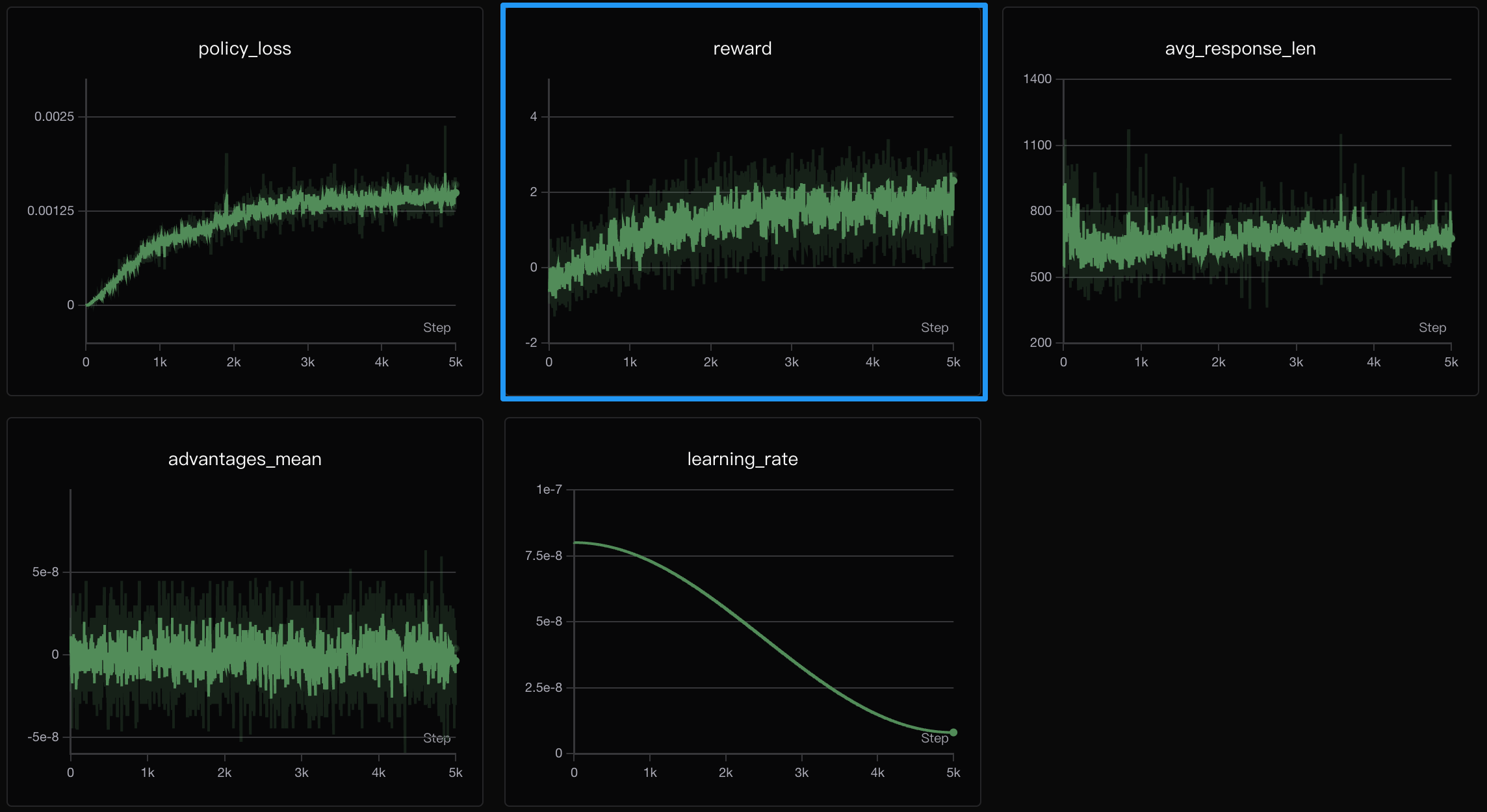
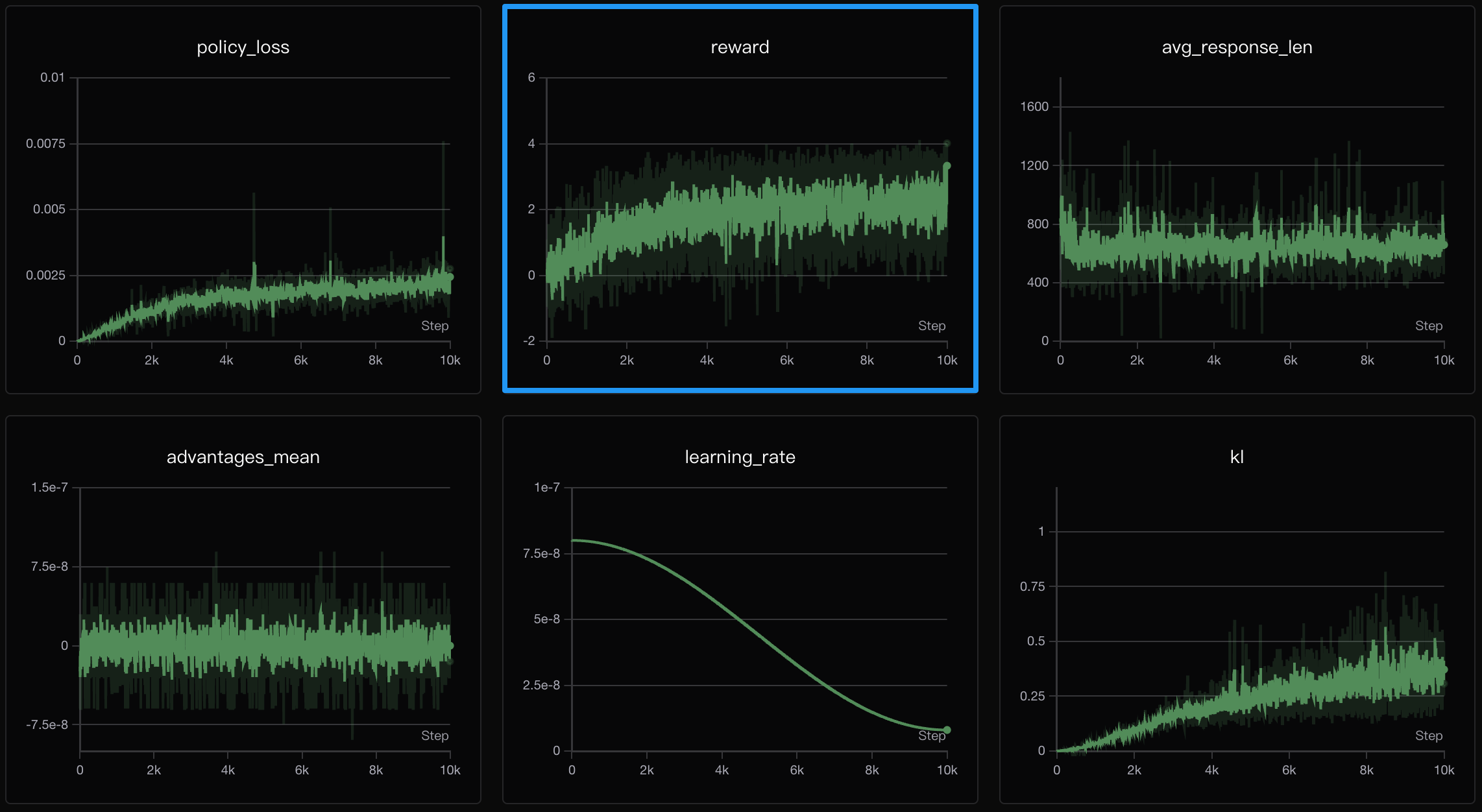
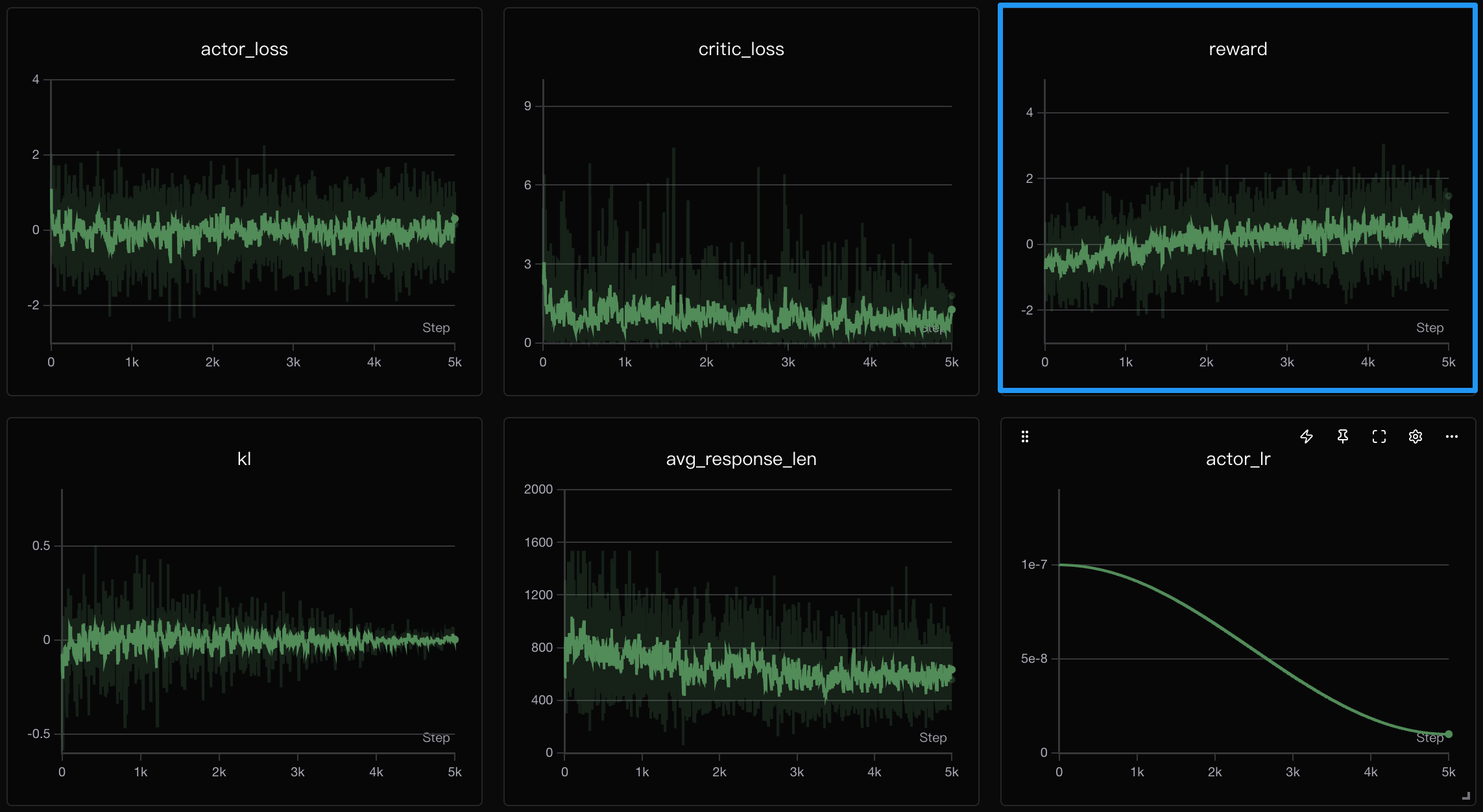
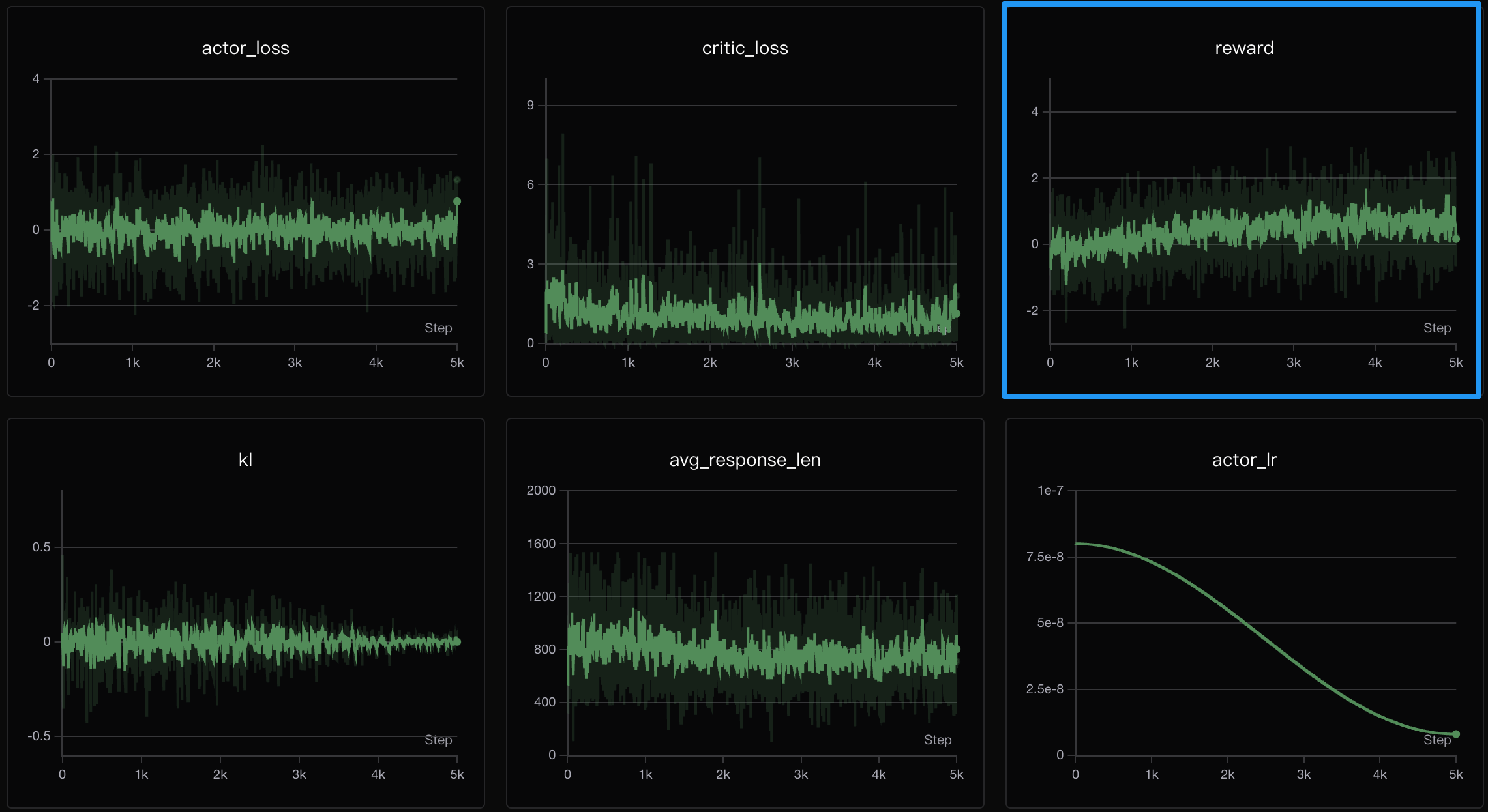
|
+- Stable but slower reward improvement
|
|
|
+- Requires both Actor and Critic networks
|
|
|
+- High memory usage (1.5-2× single network)
|
|
|
+- Good for exploration
|
|
|
|
|
|
-Distill reasoning capabilities from DeepSeek-R1.
|
|
|
+**Output**: `./out/ppo_actor_*.pth`
|
|
|
+
|
|
|
+**Training Duration**: ~1-3 hours
|
|
|
+
|
|
|
+#### 5.2 GRPO (Group Relative Policy Optimization)
|
|
|
+
|
|
|
+Modern algorithm used in DeepSeek-R1, with faster convergence.
|
|
|
|
|
|
```bash
|
|
|
-python train_distill_reason.py
|
|
|
+python train_grpo.py
|
|
|
+
|
|
|
+# Multi-GPU
|
|
|
+torchrun --nproc_per_node 2 train_grpo.py
|
|
|
```
|
|
|
|
|
|
-Output weights: `./out/reason_*.pth`
|
|
|
+**Algorithm**:
|
|
|
+$$\mathcal{L}_{GRPO} = -\mathbb{E}\left[r_t \cdot A_t - \beta \cdot \text{KL}_t\right]$$
|
|
|
|
|
|
-## 📈 Model Architecture
|
|
|
+Where advantage is computed as:
|
|
|
+$$A_t = \frac{R - \mu_{group}}{\sigma_{group}}$$
|
|
|
|
|
|
-MiniMind uses Transformer Decoder-Only architecture (similar to Llama3):
|
|
|
+**Characteristics**:
|
|
|
+- Single-network design (memory efficient)
|
|
|
+- Faster reward improvement
|
|
|
+- Group normalization removes bias
|
|
|
+- Better convergence stability
|
|
|
|
|
|
-
|
|
|
+**Output**: `./out/grpo_*.pth`
|
|
|
|
|
|
-### Model Parameter Configuration
|
|
|
+**Training Duration**: ~1-3 hours
|
|
|
|
|
|
-| Model Name | params | d_model | n_layers | kv_heads | q_heads |
|
|
|
-|------------|--------|---------|----------|----------|---------|
|
|
|
-| MiniMind2-Small | 26M | 512 | 8 | 2 | 8 |
|
|
|
-| MiniMind2-MoE | 145M | 640 | 8 | 2 | 8 |
|
|
|
-| MiniMind2 | 104M | 768 | 16 | 2 | 8 |
|
|
|
+#### 5.3 SPO (Single-stream Policy Optimization)
|
|
|
|
|
|
-## 🧪 Test Model
|
|
|
+Newest algorithm (2025) addressing GRPO's degenerate group problem.
|
|
|
|
|
|
```bash
|
|
|
-# model_mode: 0=pretrain, 1=sft, 2=rlhf, 3=reason
|
|
|
-python eval_model.py --model_mode 1
|
|
|
+python train_spo.py
|
|
|
+
|
|
|
+# Multi-GPU
|
|
|
+torchrun --nproc_per_node 2 train_spo.py
|
|
|
+```
|
|
|
+
|
|
|
+**Algorithm**:
|
|
|
+$$\mathcal{L}_{SPO} = -\mathbb{E}\left[\log \pi_\theta(a_t|s) \cdot A_t - \beta \cdot \text{KL}_t\right]$$
|
|
|
+
|
|
|
+With adaptive baseline: $B_t^{adaptive}$
|
|
|
+
|
|
|
+**Characteristics**:
|
|
|
+- No group dependency (1 input → 1 training sample)
|
|
|
+- Adaptive value tracking
|
|
|
+- Better handling of difficult examples
|
|
|
+- Experimental on small models
|
|
|
+
|
|
|
+**Output**: `./out/spo_*.pth`
|
|
|
+
|
|
|
+**Training Duration**: ~1-3 hours
|
|
|
+
|
|
|
+#### RLAIF Dataset Preparation
|
|
|
+
|
|
|
+All RLAIF algorithms use `rlaif-mini.jsonl` (1MB, 10k examples):
|
|
|
+
|
|
|
+```bash
|
|
|
+# Download dataset
|
|
|
+# Format: Same as SFT, but assistant content is "无" (none)
|
|
|
+{
|
|
|
+ "conversations": [
|
|
|
+ {"role": "user", "content": "Explain photosynthesis briefly."},
|
|
|
+ {"role": "assistant", "content": "无"}
|
|
|
+ ]
|
|
|
+}
|
|
|
+```
|
|
|
+
|
|
|
+The model generates completions during training, which are scored by a **Reward Model** (e.g., InternLM2-1.8B-Reward).
|
|
|
+
|
|
|
+**Reward Model Setup**:
|
|
|
+
|
|
|
+```bash
|
|
|
+# Download reward model to parent directory
|
|
|
+cd ../
|
|
|
+git clone https://huggingface.co/internlm/internlm2-1_8b-reward
|
|
|
+
|
|
|
+# Directory structure should be:
|
|
|
+# project/
|
|
|
+# ├── minimind/
|
|
|
+# └── internlm2-1_8b-reward/
|
|
|
+```
|
|
|
+
|
|
|
+#### RLAIF vs DPO Comparison
|
|
|
+
|
|
|
+| Aspect | DPO | RLAIF (PPO/GRPO/SPO) |
|
|
|
+|--------|-----|---------------------|
|
|
|
+| Training Type | Off-policy | On-policy |
|
|
|
+| Data Freshness | Static pairs | Dynamic (generated) |
|
|
|
+| Reward Source | Implicit | Explicit model |
|
|
|
+| Convergence | Fast | Slower |
|
|
|
+| Memory Usage | Lower | Higher |
|
|
|
+| Best For | Preference refinement | Capability improvement |
|
|
|
+
|
|
|
+### Stage 6: Reasoning Model Distillation
|
|
|
+
|
|
|
+**Purpose**: Distill DeepSeek-R1-style reasoning into MiniMind
|
|
|
|
|
|
-# Test LoRA model
|
|
|
-python eval_model.py --lora_name 'lora_medical' --model_mode 2
|
|
|
+```bash
|
|
|
+python train_distill_reason.py
|
|
|
+
|
|
|
+# Multi-GPU
|
|
|
+torchrun --nproc_per_node 2 train_distill_reason.py
|
|
|
```
|
|
|
|
|
|
+**Data Format** (`r1_mix_1024.jsonl`):
|
|
|
+```json
|
|
|
+{
|
|
|
+ "conversations": [
|
|
|
+ {
|
|
|
+ "role": "user",
|
|
|
+ "content": "Solve: 5 + 3 = ?"
|
|
|
+ },
|
|
|
+ {
|
|
|
+ "role": "assistant",
|
|
|
+ "content": "<think>\nI need to add 5 and 3.\n5 + 3 = 8\n</think>\n<answer>\n5 + 3 = 8\n</answer>"
|
|
|
+ }
|
|
|
+ ]
|
|
|
+}
|
|
|
+```
|
|
|
+
|
|
|
+**Output**: `./out/reason_*.pth`
|
|
|
+
|
|
|
+**Training Features**:
|
|
|
+- Enforces `<think>` and `<answer>` tags
|
|
|
+- Penalty loss for format violations
|
|
|
+- Mixed data (reasoning + multi-turn + English)
|
|
|
+
|
|
|
## 🔧 Multi-GPU Training
|
|
|
|
|
|
-### DDP Method
|
|
|
+### DDP (Distributed Data Parallel)
|
|
|
+
|
|
|
+Best for single-machine multi-GPU:
|
|
|
|
|
|
```bash
|
|
|
torchrun --nproc_per_node N train_xxx.py
|
|
|
+# N = number of GPUs
|
|
|
```
|
|
|
|
|
|
-### DeepSpeed Method
|
|
|
+### DeepSpeed
|
|
|
+
|
|
|
+For advanced optimization:
|
|
|
|
|
|
```bash
|
|
|
deepspeed --master_port 29500 --num_gpus=N train_xxx.py
|
|
|
@@ -157,30 +421,259 @@ deepspeed --master_port 29500 --num_gpus=N train_xxx.py
|
|
|
|
|
|
### Wandb Monitoring
|
|
|
|
|
|
+Track training progress:
|
|
|
+
|
|
|
```bash
|
|
|
# Login first
|
|
|
wandb login
|
|
|
|
|
|
-# Enable wandb
|
|
|
+# Enable wandb logging
|
|
|
torchrun --nproc_per_node N train_xxx.py --use_wandb
|
|
|
+
|
|
|
+# Or SwanLab (China-friendly alternative)
|
|
|
+python train_xxx.py --use_wandb # Automatically uses SwanLab if available
|
|
|
+```
|
|
|
+
|
|
|
+## 🧪 Model Testing
|
|
|
+
|
|
|
+### Evaluate Pretrain Model
|
|
|
+
|
|
|
+```bash
|
|
|
+python eval_model.py --model_mode 0
|
|
|
+```
|
|
|
+
|
|
|
+### Evaluate Chat Model
|
|
|
+
|
|
|
+```bash
|
|
|
+python eval_model.py --model_mode 1
|
|
|
+```
|
|
|
+
|
|
|
+### Evaluate with LoRA
|
|
|
+
|
|
|
+```bash
|
|
|
+python eval_model.py --lora_name 'lora_medical' --model_mode 1
|
|
|
+```
|
|
|
+
|
|
|
+### Evaluate Reasoning Model
|
|
|
+
|
|
|
+```bash
|
|
|
+python eval_model.py --model_mode 3
|
|
|
+```
|
|
|
+
|
|
|
+### Evaluate RLAIF Models
|
|
|
+
|
|
|
+```bash
|
|
|
+# PPO model
|
|
|
+python eval_model.py --model_mode 4
|
|
|
+
|
|
|
+# GRPO model
|
|
|
+python eval_model.py --model_mode 4
|
|
|
+```
|
|
|
+
|
|
|
+### RoPE Length Extrapolation
|
|
|
+
|
|
|
+Test with extended context:
|
|
|
+
|
|
|
+```bash
|
|
|
+python eval_model.py --model_mode 1 --inference_rope_scaling True
|
|
|
+```
|
|
|
+
|
|
|
+## 📐 Model Architecture
|
|
|
+
|
|
|
+### MiniMind Structure
|
|
|
+
|
|
|
+**Decoder-Only Transformer** (similar to Llama3):
|
|
|
+
|
|
|
+```
|
|
|
+Input Tokens
|
|
|
+ ↓
|
|
|
+Token Embedding (6400 vocab)
|
|
|
+ ↓
|
|
|
+Rotary Embeddings (RoPE) [with YaRN for length extrapolation]
|
|
|
+ ↓
|
|
|
+[Transformer Blocks] ×N
|
|
|
+ ├─ Attention (Multi-Head)
|
|
|
+ ├─ RMSNorm
|
|
|
+ ├─ SwiGLU FFN [or MoE for MoE variant]
|
|
|
+ └─ Residual Connections
|
|
|
+ ↓
|
|
|
+RMSNorm
|
|
|
+ ↓
|
|
|
+LM Head (→ 6400 vocab logits)
|
|
|
+ ↓
|
|
|
+Output Probabilities
|
|
|
+```
|
|
|
+
|
|
|
+### Model Configurations
|
|
|
+
|
|
|
+| Config | MiniMind2-Small | MiniMind2 | MiniMind2-MoE |
|
|
|
+|--------|-----------------|----------|---------------|
|
|
|
+| Parameters | 26M | 104M | 145M |
|
|
|
+| Hidden Dim | 512 | 768 | 640 |
|
|
|
+| Layers | 8 | 16 | 8 |
|
|
|
+| KV Heads | 2 | 2 | 2 |
|
|
|
+| Q Heads | 8 | 8 | 8 |
|
|
|
+| Vocab Size | 6,400 | 6,400 | 6,400 |
|
|
|
+| Context Length | 2,048 | 2,048 | 2,048 |
|
|
|
+
|
|
|
+### Modify Architecture
|
|
|
+
|
|
|
+Edit `./model/LMConfig.py`:
|
|
|
+
|
|
|
+```python
|
|
|
+class LMConfig:
|
|
|
+ hidden_size: int = 768
|
|
|
+ num_layers: int = 16
|
|
|
+ num_heads: int = 8
|
|
|
+ num_kv_heads: int = 2
|
|
|
+ # ... other configs
|
|
|
+```
|
|
|
+
|
|
|
+## 🔍 Training Tips & Best Practices
|
|
|
+
|
|
|
+### Data Quality > Quantity
|
|
|
+
|
|
|
+- High-quality pretraining data accelerates convergence
|
|
|
+- `pretrain_hq.jsonl` is carefully curated for quality
|
|
|
+- Consider data deduplication and cleaning
|
|
|
+
|
|
|
+### Learning Rate Scheduling
|
|
|
+
|
|
|
+```python
|
|
|
+# Recommended schedules
|
|
|
+- Linear warmup then decay
|
|
|
+- Initial: 1e-4 to 5e-4
|
|
|
+- Warmup steps: 10% of total
|
|
|
+- Final: 10% of initial LR
|
|
|
+```
|
|
|
+
|
|
|
+### Batch Size & Sequence Length
|
|
|
+
|
|
|
+```python
|
|
|
+# Balance between GPU memory and convergence
|
|
|
+- Pretraining: max_seq_len=512, batch_size=32
|
|
|
+- SFT: max_seq_len=512, batch_size=16
|
|
|
+- LoRA: max_seq_len=512, batch_size=16
|
|
|
+```
|
|
|
+
|
|
|
+### Memory Optimization
|
|
|
+
|
|
|
+```bash
|
|
|
+# Reduce batch size if OOM
|
|
|
+python train_xxx.py --batch_size 8
|
|
|
+
|
|
|
+# Or use gradient accumulation
|
|
|
+python train_xxx.py --gradient_accumulation_steps 4
|
|
|
```
|
|
|
|
|
|
-## 💰 Training Cost
|
|
|
+### Checkpoint Management
|
|
|
+
|
|
|
+- Saves every 100 steps by default
|
|
|
+- Each new save overwrites the old one
|
|
|
+- Automatic backup before training
|
|
|
+
|
|
|
+## 🚨 Common Issues & Solutions
|
|
|
+
|
|
|
+### Issue: CUDA Out of Memory
|
|
|
+
|
|
|
+```bash
|
|
|
+# Solution 1: Reduce batch size
|
|
|
+python train_xxx.py --batch_size 4
|
|
|
|
|
|
-Based on single NVIDIA 3090:
|
|
|
+# Solution 2: Use gradient accumulation
|
|
|
+python train_xxx.py --batch_size 16 --gradient_accumulation_steps 2
|
|
|
+
|
|
|
+# Solution 3: Use smaller model
|
|
|
+# Edit trainer script to use MiniMind2-Small instead
|
|
|
+```
|
|
|
+
|
|
|
+### Issue: Training Not Converging
|
|
|
+
|
|
|
+```python
|
|
|
+# Possible causes:
|
|
|
+1. Learning rate too high/low
|
|
|
+2. Data quality issues
|
|
|
+3. Model capacity mismatch
|
|
|
+
|
|
|
+# Solutions:
|
|
|
+- Reduce learning rate: --learning_rate 1e-5
|
|
|
+- Check data format and quality
|
|
|
+- Try smaller model first
|
|
|
+```
|
|
|
+
|
|
|
+### Issue: Multi-GPU Sync Errors
|
|
|
+
|
|
|
+```bash
|
|
|
+# Ensure:
|
|
|
+1. All GPUs visible: nvidia-smi
|
|
|
+2. Same CUDA version across all GPUs
|
|
|
+3. Network connectivity for distributed training
|
|
|
+
|
|
|
+# Debug:
|
|
|
+torchrun --nproc_per_node 2 train_xxx.py --debug
|
|
|
+```
|
|
|
+
|
|
|
+### Issue: Different Results Than Expected
|
|
|
+
|
|
|
+```python
|
|
|
+# Check:
|
|
|
+1. Random seed set (reproducibility)
|
|
|
+2. Correct model checkpoint loaded
|
|
|
+3. Correct dataset being used
|
|
|
+4. Same hyperparameters as reference
|
|
|
+```
|
|
|
+
|
|
|
+## 📈 Training Progression
|
|
|
+
|
|
|
+Typical training curves:
|
|
|
+
|
|
|
+```
|
|
|
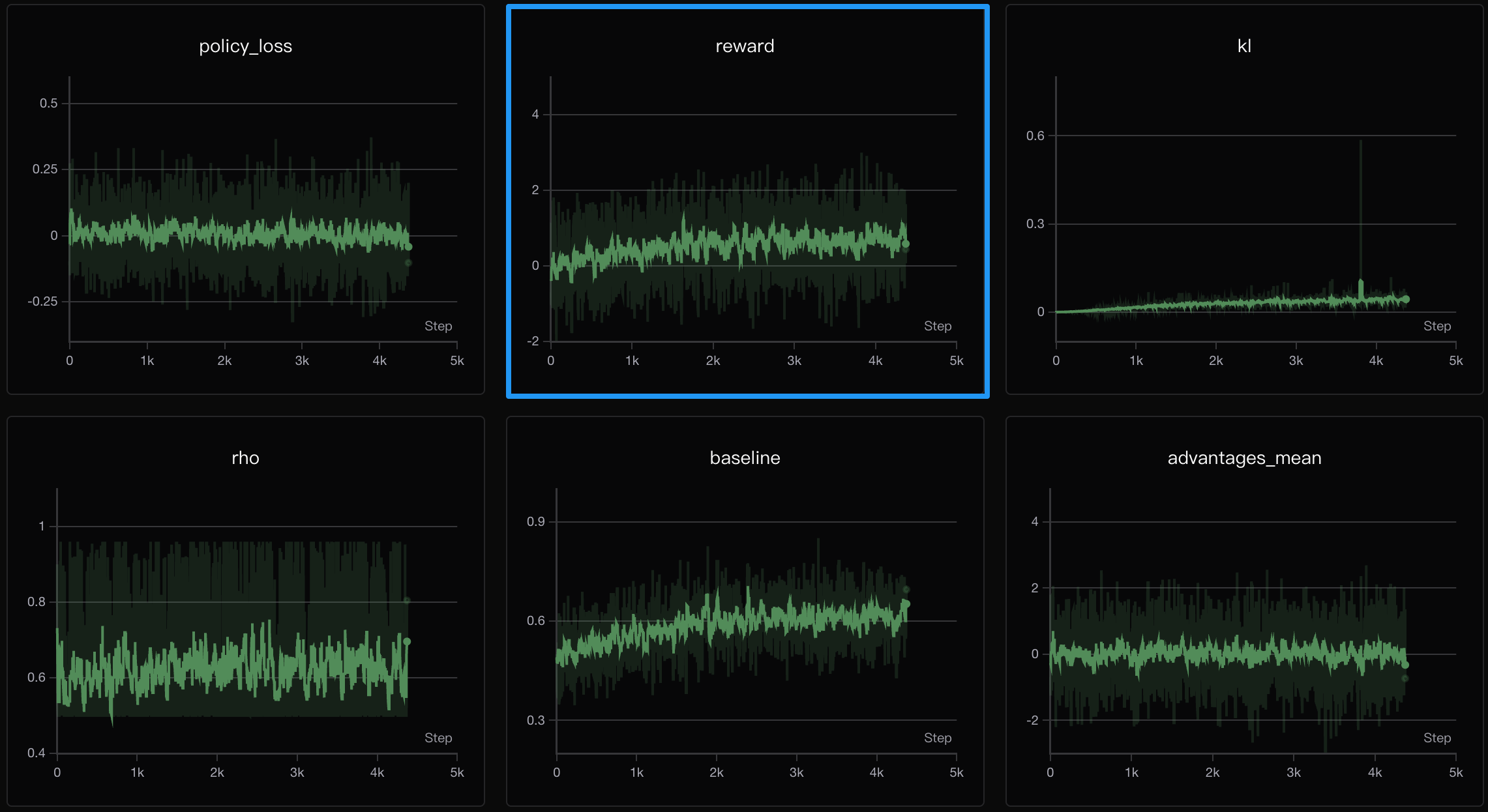
+Pretraining Loss: ↘↘↘ (steep decline, then plateau)
|
|
|
+SFT Loss: ↘ (steady decline)
|
|
|
+PPO Reward: ↗ (rising, may plateau)
|
|
|
+GRPO Reward: ↗↗ (faster rise, more stable)
|
|
|
+```
|
|
|
+
|
|
|
+## 🎓 Advanced Topics
|
|
|
+
|
|
|
+### Custom Datasets
|
|
|
+
|
|
|
+Create your own dataset:
|
|
|
+
|
|
|
+```python
|
|
|
+# Format: JSONL with conversations list
|
|
|
+# Each line is one training example
|
|
|
+# Ensure consistent quality and format
|
|
|
+```
|
|
|
+
|
|
|
+### Model Quantization (Post-training)
|
|
|
+
|
|
|
+```bash
|
|
|
+# 4-bit quantization for inference
|
|
|
+# Use tools like:
|
|
|
+# - llama.cpp (gguf format)
|
|
|
+# - bitsandbytes (dynamic quantization)
|
|
|
+# - AutoGPTQ (static quantization)
|
|
|
+```
|
|
|
+
|
|
|
+### Model Merging
|
|
|
+
|
|
|
+```python
|
|
|
+# Merge base model + LoRA weights
|
|
|
+# Use tools like: peft, llama.cpp
|
|
|
+```
|
|
|
|
|
|
-| Dataset Combination | Duration | Cost | Effect |
|
|
|
-|-----------|------|------|------|
|
|
|
-| pretrain_hq + sft_mini_512 | 2.1h | ≈$0.35 | 😊😊 Basic chat |
|
|
|
-| Full dataset (MiniMind2-Small) | 38h | ≈$6.50 | 😊😊😊😊😊😊 Complete capabilities |
|
|
|
-| Full dataset (MiniMind2) | 122h | ≈$20.80 | 😊😊😊😊😊😊😊😊 Best performance |
|
|
|
+## 📚 References
|
|
|
|
|
|
-!!! success "Quick Reproduction"
|
|
|
- Using `pretrain_hq` + `sft_mini_512`, single 3090 only needs **2 hours + $0.5** to train a ChatBot!
|
|
|
+- [Scaling Laws](https://arxiv.org/pdf/2001.08361.pdf)
|
|
|
+- [RoPE Position Embeddings](https://arxiv.org/abs/2104.09864)
|
|
|
+- [YaRN Length Extrapolation](https://arxiv.org/abs/2309.00071)
|
|
|
+- [PPO Algorithm](https://arxiv.org/abs/1707.06347)
|
|
|
+- [GRPO (DeepSeek)](https://arxiv.org/pdf/2402.03300)
|
|
|
+- [SPO Algorithm](https://arxiv.org/abs/2509.13232)
|
|
|
+- [DPO](https://arxiv.org/abs/2305.18290)
|
|
|
|
|
|
-## 📝 Common Issues
|
|
|
+---
|
|
|
|
|
|
-- **Out of memory**: Reduce `batch_size` or use DeepSpeed
|
|
|
-- **Training not converging**: Adjust learning rate or check data quality
|
|
|
-- **Multi-GPU training error**: Ensure all GPUs are visible and CUDA versions are consistent
|
|
|
+**Next**: Deploy your trained model or explore [advanced inference options](quickstart.md#third-party-inference-frameworks)
|
|
|
|

 jingyaogong